Powered By Blogger

Senin, 29 November 2010

Review BlackBerry Torch 9800


Ini dia seri Blackberry terbaru sekaligus yang paling canggih yang dihadirkan RIM (Research In Motion), yaitu  BlackBerry 9800 atau yang diberi sebutan ‘Torch’. Blackberry Torch memiliki penampilann desain baru, yaitu berlayar sentuh plus qwerty geser. Selain itu Blackberry Torch juga sudah mengadopsi sistem operasi terbaru, yaitu OS Blakcberry 6. Dan Torch menjadi seri Blackberry yang dibekali OS terbaru ini.
Seperti telah disebutkan, Torch berdesain tombol qwerty geser. Dalam keadaan tombol qwerty tersembunyi, desain dan ukurannya agak mirip dengan Onyx.  Tapi bobotnya terasa lebih berat Torch. Sebagian besar bodi Torch berbahan plastik glosy, kecuali bagian penutup baterai di belakang yang berbahan karet berkontur garis. Torch dihiasi lubang Jack 3,5 mm headset, tombol volume dan tombol kamera di sisi kanan, dan port MicroUSB untuk charger dan kabel data di samping kiri. Di bawah layar disematkan tombol : Trackpad, Call, End Call, Back dan Option (tombol logo Blackberry).
Layar
Layar sentuh di Tocrh tidak lagi bersifat Surepress seperti yang ada pada layar Blackberry Storm. Dimana untuk mengaktifkan fitur tidak cukup dengan menyentuh layar tetapi juga harus menekan layar. Nah, layar sentuh Torch berupa layar sentuh biasa. Seperti RIM belajar dari pengalaman Storm yang banyak penggunanya mengeluh dengan metode layar sentuh Surepress. Tampilan menu di layar Torch terbagi menjadi 5 homescreen (All, Favorite, Media, Downloads, Frequent), yang bisa diganti dengan mengusap layar ke kanan/kiri. Untuk memunculkan tampilan menu utama, dengan ‘menyeret’ ke atas tombol panah yang berada di bagian bawah layar. Sensor gerak sudah dipendam di Torch yang berfungsi untuk Autorotate. Tampilan di layar ini terlihat luas dan tajam.
Selain dengan menyentuh layar, akses menu juga bisa dengan tombol Trackpad. Empat tombol yang ada di sebelah kanan dan kiri Trackpad, sekilas seperti berjenis touchpad, ternyata berupa tombol biasa yang harus ditekan. Untuk mengeluarkan tombol qwerty, cukup geser bagian layar ke atas. Tombol qwerty terasa empuk ditekan, posisinya dan ukurannya juga nyaman. Ternyata layar sentuh Torch juga menyimpan tombol qwerty virtual di layar.
Internet
Mengakses internet di Torch terasa cepat. Ini karena Torch bisa mensuport hingga jalur HSDPA/HSUPA (3,5 G). Atau juga bisa inetrnet di hotspot via koneksi WiFi. Saat browsing, browser bisa membuka beberapa situs sekaligus (multitasking). Selain itu situs apa saja yang sedang dibuka bisa dilihat secara berjejer. Dan ini merupakan fitur baru yang dibawa OS Blackberry 6. Browser dilengkapi dengan beberapa fasilitas, seperti : Find on Page (mencari kata), Send Page Address (mengirim alamat situs), Copy Page Address, dan Search (via Google, Yahoo, Live Search, Wikipedia, Dictionary.com). Untuk Zoom In/Out halaman situs bisa dengan cara ‘mencubit’ layar atau multitap (dua kali tekan layar). Saat halaman situs diperbesar, bisa memilih bagian mana dari situs yang ingin dilihat, dengan cukup mengusap layar.
Social Feed
Social Feed juga menjadi fitur baru yang dibawa OS Blackberry 6. Fitur ini bisa menggabungkan update status dari Facebook, Twitter, My Space, dll. Juga bisa ditambahkan RSS Feeds dan chatting dari Blackberry Messenger, Google Talk, AOL Instant Messaging, Windows Live Messenger dan Yahoo Messenger. Tapi bisa juga difilter sehingga ditampilkan per aplikasi. Untuk berganti antar aplikasi, cukup usap layar ke kanan atau kiri. Di sini juga bisa hanya dengan mengetikkan satu status, maka akan dikirimkan ke beberapa aplikasi sekaligus (Facebook, Twitter, dll). Untuk bisa merasakan fitur ini, maka harus Log In terlebih dahulu ke tiap aplikasi online.
Kamera
Untuk mengabadikan momen tertentu, Torch dilengkapi dengan kamera 5 megapiksel. Di dalamnya ditemani fasilitas seperti: Autofocus, Flash, Face Detection, Portrait, Sport, Landscape, Close up, Image Stab ilization, Scene dan Geotagging.  Hasil foto dan bisa dikirim via email, MMS atau ke facebook. Kamera juga bisa merekam video, dengan hasilnya berupa video berresolusi maksimal 640 x 480 piksel. Foto bisa dilihat secara Zoom In/Out dengan cara ‘mencubit’ atau multitap layar. Ada fitur View On Maps untuk melihat lokasi pemotretan foto pada peta digital.
Musik
Music Player di Torch memiliki tampilan baru, yaitu adanya tampilan animasi dari Album Art (gambar yang menyertai lagu) yang dimiliki tiap lagu. Jadi untuk ganti lagu cukup mengusap Album Art ke kana atau kiri. Music Player-nya sendiri dilengkapi dengan fitur Playlist, Shuffle, Repeat, Equalizer (12 pilihan) dan Audio Boost. Suara lagu yang keluar dari speaker di bodi atas terdengar nyaring dan jernih.
Maps
Torch sudah ditanamkan GPS Receiver, yang dalam bekerja dibantu peta digital Blackberry Maps. Saat mengaktifkan Blackberry Maps, otomatis langsung mendeteksi dimana lokasi ponsel berada. Setelah itu bisa mengirim titik lokasi itu (Send Location), mencari lokasi tertentu lainnya (Find Location) atau mengetahui rute menuju ke lokasi tertentu (Get Direction). Tampilan peta digital bisa di Zoom In/Out dengan cara ‘mencubit’atau multitap. Jangan lupa, akses Blackberry Maps membutuhkan koneksi internet
Mobile Office
Torch ternyata bisa digunakan untuk membantu pekerjaan, terutama yang berhubungan dengan dokumen. Ini karena sudah ada fitur Mobile Office yang terpendam di ponsel. Fitur ini masih bersifat trial, tapi selain membuka file office (word, excel, power point), ternyata juga bisa mengedit file office langsung dari ponsel. Sedangkan untuk membuat file baru harus diupgrade ke versi full dengan cara membeli. Mobile Office antara lain dilengkapi fitur ‘Copy/Cut – Paste’ teks, dan fitur ‘Find’ untuk mencari kata tertentu, dan fitur lainnya. Mobile Office juga sudah mensuport file Office 2007
App World
Blackberry Application World (App World) merupakan toko online untuk mendownload aplikasi dan game. Di Torch, App World yang terinstall sudah berversi 2.0 (terbaru). Fitur baru yang dihadirkan yaitu adanya Blackbery ID (pendaftaran). Lalu ada Barcode yang ketika di-scan akan menampilkan info dari aplikasi. Sistem pembayaran untuk membeli aplikasi juga semakin mudah, via PayPall atau kartu kredit. Serta menu ‘Top 25’ yang bisa menampilkan 25 aplikasi terfavorit lebih komplit berdasarkan kategori : recently update, paid apps, free apps, newest. Jika belum memiliki Blackberry ID bisa langsung membuatnya di App World.
Spesifikasi :
Jaringan : GSM (850/900/1800/1900 MHz); Sistem Operasi : Blackberry OS 6.0; Dimensi : 11,1 (close)/1,48 (open) x 6,2 x 1,46 cm; Berat : 161,1  gram; Layar : TFT Touch Screen 480 x 360 pixels 3,2  inchi; Memori Internal : 512 MB flash memory / 512 MB SDRAM; 4 GB eMMC; Memori Eksternal : micro SD hingga 32 GB, 4 GB included; Internet :  GPRS, EDGE, UMTS (3G), HSDPA, HSUPA, WI-FI; Koneksi : Bluetooth, Kabel Data microUSB; Messaging : SMS, MMS, Email, Instant Messaging; Kamera : 5  Megapiksel (2592 x 1944 pixels); Video Recorder : 640×480 pixels, Auto focus Image Stabilization Scene Durasi unlimited; Video Player: MPEG4, H.263, H.264, WMV3; Musik Player: MP3, AMR-NB, AAC-LC, AAC+, eAAC+, WMA, WMV, Flac, Ogg Vorbis, Equalizer, Shuffle Audio Boost; Fitur Lain : Task Timer  Alarm Calendar Stopwatch Memo calculator Note Clock FaceBook Twitter BlackBerry Messenger My Space Social feeds  GPS Application World Yahoo Messenger Google Talk AOL Messenger Windows Live Messenger Office To Go Voice recorder

2009 Yamaha YZR-M1 Specs revealed in online presentation

Fiat Yamaha present details of their 2009 machine to press and fans online.

2009 Yamaha YZR-M1 Specs revealed in online presentation How to follow up the standout bike of the 2008 season for 2009? That was the question posed to Fiat Yamaha when building the factory version of the M1. The bike got its first run-out with World Champion Valentino Rossi in post-race testing at Valencia last year, and has undergone further development over the winter. Today, as part of the factory team´s official online presentation, details of the new machine were released to the public.
`In 2008, when we won everything: the Constructors´ title, the Riders´ title, the Teams´ title, it provoked a great motivation and reaction from rival riders and factories and they must have all started working to produce a bike capable of beating us,´ says Davide Brivio, Team Manager for Rossi´s side of the partitioned garage.
`We´ll do the same. This is the nice thing about motor racing: during the winter there is a lot of talk, because this or that rider is faster on this or that occasion, the fans and the journalists start passing judgements and making forecasts. Then, the facts disprove many of them and this is the most interesting part of our job.´
The specifications for the 2009 bike reveal a machine not too dissimilar to the previous winning formula, a philosophy noted by second Team Manager Daniele Romagnoli.
`In 2008 the bike was successful, so there was no reason to change the concept and the new bike is very similar to the previous one. Changing to Bridgestone tyres during the season, it became clear that the adjustments required were different from the previous set up. So, the new bike can have a wider range of adjustments,´ says the man behind Jorge Lorenzo´s title push in 2009.
`This allowed us, during the latest tests, to try different geometries, which improved acceleration after corners because we managed to increase the contact of the front tyre with the ground. We´ve also worked on engine management controls and maps, which enhance acceleration; our riders can open the throttle a few metres earlier.
`Valentino also worked on the engine and noticed an improvement in acceleration, and he said we are working in the right direction. So, we´ve just got to wait for the Sepang test with Jorge to have the whole package. This year the Japanese and Yamaha will surprise again. We´re confident the bike will be equally competitive in 2009.
2009 YZR-M1 Specs in full
ENGINE: Liquid cooled Crossplane crankshaft inline four-cylinder, four stroke.
POWER: Over 200 horsepower (147KW).
TOP SPEED: In excess of 320kmh.
TRANSMISSION: Six-speed cassette-type gearbox, with alternative gear ratios available.
CHASSIS: Aluminium twin tube delta box, multi-adjustable steering geometry/wheelbase/ride height. Aluminium swingarm.
SUSPENSION: Ohlins upside down front forks and Ohlins rear shock, all adjustable for pre-load, high and low-speed compression and rebound damping. Alternative rear suspension links available.
WHEELS: Marchesini 16.5 front, 16.5in rear, available in a variety of rim widths.
TYRES: Bridgestone, 16.5 front, 16.5in rear, available as slick, intermediate, wet and hand-cut tyres.
BRAKES: Brembo, two 320mm carbon front discs, two four-piston callipers. Single 220mm stainless steel rear disc, twin-piston calliper.
WEIGHT: 148kg. In accordance with FIM regulations

Europe's Hylas-1 broadband Internet satellite launched


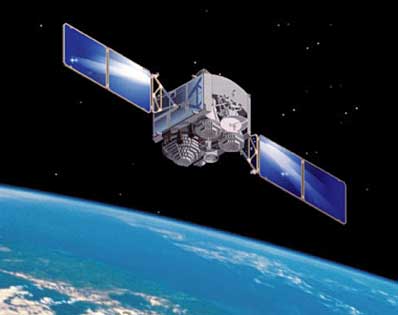
A satellite that promises to bring broadband Internet to several areas of Europe was successfully launched late Friday.

The Hylas-1 satellite was carried into space on top of an Ariane 5 rocket from the European Spaceport in Kourou, French Guiana. Lift-off was at 3:39 pm local time (6:39 pm GMT). (See video of the launch on YouTube.)

The satellite will cover areas of the U.K., Ireland, Spain, Portugal and Eastern Europe via eight regional spot beams. Unlike conventional satellites that cover the whole of the continent, the spot beams on Hylas-1 are focused on smaller parts of the continent. That means the same frequencies can be re-used in different beams, increasing the overall bandwidth of the satellite.

While some nations in Europe are well served by fixed-line broadband, others lag far behind. Low penetration is sometimes due to the lack of broadband access in rural areas, where carriers are less likely to invest because the lower population density makes the return on investment lower.

The Hylas service is targeted at areas where the wired broadband infrastructure is not available or is available at slow speeds.

The satellite is owned by Avanti Communications, a U.K.-based company that sells broadband service to telecom carriers for resale to individual businesses and consumers.

It has already announced a string of contracts with telecom and IT services companies in Europe. One unnamed customer will provide broadband Internet, television and IP telephony services in the U.K. via the satellite, Avanti said.

A second satellite, Hylas-2, is scheduled to be launched in 2012 and will cover parts of the Middle East and Africa. Avanti estimates that the two satellites will together be able to provide broadband Internet for around 1 million users.

Great Gaming Laptops You Might Haven’t Heard Before

gateway
Kamu seorang gamer? Kamu bisa menghabiskan berjam-jam di depan layar komputer untuk membasmi penjahat, menjadi pembalap, atau menebas monster-monster? Apakah kamu pernah berpikir untuk membawa kegiatan gaming anda kapanpun dan kemanapun anda pergi dan tidak lagi mengandalkan PC yang dibatasi oleh dinding kamar kamu? Gaming laptop adalah solusinya. Laptop yang portable ditambah dengan spek yang powerful siap menemani kamu kemanapun kamu pergi.
Tapi laptop jenis ini terkenal mahal. Kamu mungkin pernah mendengar tentang Alienware Area-51 yang produk tercanggihnya berkisar di angka $5000 atau Asus seri G yang tidak jauh berbeda. Pada artikel ini saya akan memaparkan 3 gaming laptop yang tidak kalah dari Alienware dengan budget yang jauh lebih murah (meskipun menurut saya pribadi masih terhitung mahal hehe). Ketiga notebook ini sama-sama memiliki merk yang kurang akrab di telinga dan terhitung agak sulit dicari barangnya di Indonesia tapi saya jamin worthed. Mereka adalah :
1. MSI GT627
Produk yangmsi satu ini memiliki ukuran layar 15.4” widescreen dan dipersenjatai dengan prosesor Intel Core 2 Duo P8400 at 2.26, ram 4 GB DDR2, hardisk sebesar 320GB, dan yang paling penting memiliki VGA yang mendukung gaming kelas berat, nVIDIA GeForce 9800M GS dangan 1 GB GDDR3. Dengan spek seperti ini kamu dijamin bisa memainkan Crysis dengan resolusi maksimalnya (1280 x 800) dengan overall setting High. Pada gaming laptop,tampilan juga penting layaknya performanya. Dan laptop asal Taiwan ini cukup tidak mengecewakan. Dibalut warna hitam di sekujur bodynya dengan sedikit aksen merah, membuat laptop ini terkesan sangar dan cocok untuk nge-game. Tapi Laptop ini memiliki satu kekurangan, yaitu sound externalnya tidak begitu bagus. Tapi hal ini bisa dengan mudah diatasi dengan memakai external speaker, karena MSI GT627 juga menyediakan 7.1 channel output audio. GT627 bisa kamu dapatkan di Indonesia karena telah ada distributor MSI di sini. Harganya kurang lebih $1200. Tidak terlalu mahal bukan?
2. GATEWAY P-7811FX
Merasa asing dengan nama Gateway? Bukan, Gateway bukan perangkat jaringan itu. Ggatewayateway disini adalah sebuah merk laptop yang terkenal akan spek tinggi dan harga rendahnya. Tapi laptop ini sulit ditemukan di Indonesia jadi siap-siap untuk nitip teman yang keluar negeri kalau kamu berminat. P-7811FX menggunakan nVIDIA GeForce 9800M GTS dengan 512MB GDDR3 yang bisa dibilang lebih baik daripada 9800M yang dimiliki MSI GT627. Laptop yang memiliki layar 17” ini diperkuat dengan prosesor Intel Core 2 Duo P8400 at 2.26, ram 4GB DDR3, dan memiliki hardisk sebesar 200GB. Layar yang lebar dan resolusi maksimal yang tinggi yaitu 1920 x 1200 dijamin akan memanjakan anda yang mengemari sensasi benar-benar masuk ke dalam game. Desain laptop ini kokoh dan terkesan sporty dengan warna bodynya yang hitam dan aksen oranye. Sayang bahan plastik yang digunakan untuk laptop ini mudah dikotori oleh sidik jari. Kekurangan lainnya adalah tidak adanya fitur bluetooth dan hardisk yang tergolong kurang untuk instalasi berbagai macam game high-end. Dengan harga sekitar $1500 laptop ini cukup menarik untuk anda pertimbangkan.
3. SAGER NP 5797
Juga merasa asing dengan nama Sager? Sager terkenal sebagai produsen laptop game rakitannya. Artinya kamu bisa memilih sendiri spesifikasi laptop yang kamu inginkan dengan chassis yang sudah disediakan. Sager memiliki tingkat sagerkustomisasi tinggi, kamu bahkan bisa memilih jenis LCD yang digunakan 17” WSXGA+ (1680 x 1050) atau 17” WUXGA (1920 x 1200). Saya mencoba merancang spesifikasi maksimal dengan prosesor Intel Core 2 Extreme mobile processor at 2.8GHz, ram 4GB DDR3, hardisk 320GB, dan graphic processor nVIDIA GeForce 9800M GTX dengan 1GB DDR3 VRAM. Spesifikasi seperti ini mungkin hanya kalah dengan gaming laptop yang bisa multi-GPU. Merupakan suatu hal yang luar biasa sebuah laptop memiliki spek seperti ini. Kamu juga bisa memilih 2 warna pilihan, hitam yang sekilas mirip desain Gateway atau putih yang nggak kalah keren. Tetap sangar dan kokoh. Dengan spek seperti di atas tentu laptop ini yang paling mahal diantara ketiga laptop di artikel ini (meskipun saya tak bisa menerka pasti berapa rupiah) tapi Alienware dengan spek serupa bisa lebih mahal 10 juta rupiah daripada Sager. Laptop ini juga cukup mudah ditemukan di Indonesia. Bahkan kamu bisa merakit spek yang kamu inginkan secara online di http://www.rakitnotebook.com Official Website Sager Indonesia. Bagaimana menurut kamu? Beli atau tidak, itu keputusan kamu (dan dompet kamu). – amizanf

Review Games : Call of Duty Black Ops

 Call of Duty - Black Ops G1 ...

This is the best storytelling in the Call of Duty franchise since the series first hit the beaches of Normandy. The fact that the game is set somewhere in the past rather than in the present or the near future really helps. There's a feeling of importance to everything that you do, drawn not from the overarching threat of the game, but from the knowledge that you are revisiting moments in time and geographical spaces that are significant beyond the simple shooting of enemies that will take place there.

It also helps that Black Ops has limited the number of characters the gamer is experiencing, while focusing the narrative around just one, Alex Mason, the man who endures quite a bit of torture and explores his memories in order to deliver playable levels and the new Call of Duty narrative.

The flashback narrative mechanic is also well chosen, allowing the developer to offer a justification for the non stop action nature of the game, with well placed fade to black transitions allowing the player to skip the pieces that the creators thought would be boring overall.

The story has a few predictable twists and turns and the final third moves into some pretty science fiction territory but even there the people at Treyarch keep the story on track, playing on themes like Soviet infiltration, the Red Scare, the nature of memories and how a man can be turned against himself that are not to be out of place in a thriller set during the Cold War.

It's still all delivered using the mechanics of a huge action movie and the story is not the most important thing about Black Ops but the game never generates the feeling that all cutscenes and dialog are surplus to requirements like in Modern Warfare 2. It also lacks the shock based sequence, like No Russian and the atomic detonation, which impressed a lot of people in previous titles.

Gameplay

Coming from something wide open like Fallout: New Vegas it's almost jarring that the beautiful, huge spaces that Black Ops shows to the player cannot be explored fully and, worse, cannot be influenced in any way. But after accepting the fact that this is a Call of Duty game, meaning huge amounts of scripting, linear paths for all levels and enemies that pop up and don't have the smarts to do anything else, there's a lot of fun to be had with the new Call of Duty.

The levels are overall well designed, with exceptions like a certain rooftop chase and the Vietnam Khe Sahn battle, where a lot more could have been done. The number of enemies on the screen forces the player to pay attention and be careful with his movement and aiming, despite the fact that opposing forces are as dumb as ever, failing to try and flank or advance in big numbers at the same time. There are some cheap kills, mostly based around baddies popping out of thin air or grenades, which will infuriate players but overall it's all solid action punctuated by some vehicle sections (the helicopter one being pretty weak) and some scripted actions that can feel out of place (interrogation involving broken glass?).

Unfortunately Call of Duty seems to be developing a problem linked to actual gun identity. I found that I could very well dispatch enemies with every model and variation, never worrying about what I am wielding and if it´s the right weapon for the situation. Shotguns should be far worse at longer range and heavy machine guns incredibly hard to aim. The developers should really work to make weapon choices (some of the most significant choices to make in shooter, in general, and Call of Duty, in particular) more meaningful and at least at times make the player worry a bit about ammunition.

The constant addition of movie like qualities to Call of Duty also bears the question: how long before the series actually becomes an interactive movie or until someone hacks the code to allow the player to just use the move keys, with the fire buttons always pressed?

Black Ops already decides to take a lot of agency from the player. He cannot choose where to hide bodies. He cannot decide how to use a binocular. He cannot choose when to detonate fire bombs. He cannot choose how to stealthily approach an enemy location. At times it feels like the human behind the controller is just there to sanction decisions made by the developer and push levels forward.

One place where the Black Ops offers agency is in the zombie modes, where purchasing decisions really matter. The modes, refined after making their debut in World at War, are engaging in a way that the cooperative play in Modern Warfare 2 never were, and shooting zombies while playing certain important historical Cold War figures is a very nice piece of fan service.

Conclusion

It's hard to argue with the millions of people who will buy and then play Call of Duty: Black Ops and say that this is a disappointing video game. The reality is that it's not as long as the gamer is willing to accept the limitations that are associated with the franchise. The presentation is wonderful, the custscenes are engaging and informative, the story is very thriller like, the shooting is monotone but still engaging, the visuals good.

But there's so much more potential in Call of Duty Black Ops that goes unrealized. An extra path that leads to the conclusion of each level would have made this game so much better. More difference when it comes to the weaponry a player can use would have introduced some much needed tactical thinking and variation. Longer levels, with some boring bits like working the controls of a plane or listening to banter between other soldiers, might have added to the depth of the experience.


Call of Duty Black Ops

Call of Duty Black Ops

Internet Explorer vs Opera vs Mozilla Firefox

Image
When you want to surf the net, you click on the blue ‘e’ on you desktop. That’s all there is to it. Why should you have to choose a browser? And is there a choice at all? Isn’t the word ‘browser’ synonymous with ‘InternetExplorer’?
With the recent spate of browser-related security incidents all over the world, it might be useful to get to know what choices you have. Many of Microsoft’s products, and most importantly the ubiquitous Internet Explorer, make use of a technology called ‘ActiveX Controls’. While these are very useful pieces of software, and help to enhance many multimedia-related and other functionalities in your browser and on the desktop, they are also a huge security threat. It is extremely easy to hijack your browser by abusing one of the ActiveX interfaces, and through that security hole take over your entire computer in a matter of minutes.
In response to the innumerable viruses, worms and other exploits that have plagues Windows users in recent years, Microsoft released the Service Pack 2 for windows XP some time ago. This proposes to plug many of the security holes by imposing stricter controls over the ActiveX interface in Internet Explorer. This has met with moderate success, but still the exploits continue. Perhaps the time has come for the ordinary user to look for other choices in the field of the browser, which is one of the most essential pieces of software that we need in our everyday desktop computing.
First, take a look at Opera. This is an unbelievably small, tight, compact browser that is developed by a Norwegian company. While Internet Explorer for Windows XP is a humongous download, the latest version weighing in at nearly 100 megabytes, Opera is only a little more than 3 Mb, and offers much, much greater functionality at that! It’s incredible how much usefulness the guys from Scandinavia have been able to pack into this tiny, sprightly browser. From changing the browser identification code to applying a vast range of themes and skins, from offering multiple-tabbed browsing to the simple yet elegant idea of mouse gestures, Opera has sweet surprises and wonderful easter eggs waiting for you at every turn.
And those of you who have never used anything other than Internet Explorer in your life, you will probably discover for the first time how fast your internet connection really is, for Opera doesn’t have to negotiate with the great overhead of interfacing tightly with the operating system, like Internet Explorer does. You’ll be surprised to see pages which took more than half a minute to be displayed fully come to life in less than five seconds!
Another equally good choice is Firefox, which is really the Netscape browser of old, reborn in a new form and under a new license. Compared to Opera, Firefox is a bare-bones browser, with only the basic functions built in. this greatly simplifies the interface, making it a perfect choice for non-expert computer users. But those of you who need more usability built in, you’ll find an extensive repository of ‘extensions’, which add features to it. The extensions can be installed directly from within the browser, and you get to browse the features descriptions, user ratings and popularity of each extension before you choose it.
An added advantage of Firefox is that it is Free Software, and consequently its source code is publicly available. Even you can download it and find out which part does what, but even if you aren’t a programmer, you have the extra assurance that thousands of hackers all around the world are looking at the code every minute, so there no place where trojans, bugs or security loopholes can hide. This is what, in fact, makes Free Software such a great choice for the security conscious.

Minggu, 28 November 2010

Search


Jumat, 26 November 2010

Komparasi 4 Tablet PC Terbaik Saat Ini


Langkah Apple yang menghadirkan iPad memprovokasi produsen komputer dan produsen non-PC untuk membuat tablet PC tandingan. Di lain pihak Apple mengatakan telah menjual lebih dari 450 ribu iPad dalam beberapa hari pertamanya Konsumen terpikat dengan cara baru menggunakan komputer yang direpresentasikan iPad mengusung faktor layar sentuh dan hiburan tanpa keyboard.Tetapi komentator dan konsumen juga telah membicarakan kekurangan iPad, misalnya menyangkut kamera. Selain itu ketidakmampuan lebih banyak dalam hal konten hiburan web seperti video, jika berbentuk Flash.

Maka dari itulah sekarang mulai bermunculan tablet PC sejenis yang di klaim mampu bekerja lebih baik dari ipad,,tetapi apa benar ipad akan bergeser dari singgasana?? Yuk kita liad komparasi beberapa saingan berat Ipad
  • Apple Ipad


Dengan dimensi panjang 9.56 inchi (242.8 mm), lebar 7.47 inchi ( 189.7 mm) dan ketebalan 0.5 inchi (13.4 mm), beratnya tidak lebih dari 0.68 kg. Kalau anda pernah mempunyai iPod Touch ataupun iPhone 3G, kira-kira bentuknya ya seperti itu. Permukaan layar sentuhnya sangat tahan gores (temanku pernah menggores layar iPhone dengan kunci kontak sepeda motor tanpa menimbulkan bekas sedikitpun dilayarnya). Sama-sama menggunakan layar sentuh transitive, sehingga tidak memerlukan stylus untuk mengakses menu, cukup sentuh, geser dan “cubit” layarnya maka kita bisa berinteraksi dengan semua program yang ada.

Sejatinya alat ini tidak bisa digunakan untuk komputasi tingkat menengah. Menggunakan prosesor Cortex A8, RAM hanya 256MB dan ditunjang PowerVR SGX 535 untuk memperkuat pengolahan tampilan, iPad tidak lebih dari sebuah iPod Touch dengan bodi yang 3x lebih bongsor, layar lebih lebar dan ketersediaan hardisk solidstate 16,32 dan 64 GB.

iPad lebih mengedepankan fungsi sebagai eBook reader, internet tablet dengan model dan desain yang sangat funky.

  • Samsung Galaxy Tab


Desain Galaxy Tab, cukup ringan 380 gram dengan dimensi ramping sehingga mudah digenggam dan digunakan. Belum lagi pengguna dimanjakan dengan layar 7 inci TFT-LCD yang mampu memberikan tontonan film, melihat gambar, membacara atau berbagi dokumen.Selain itu pengguna dengan mudah berkomuikasi melalui email, telephone dan video call, SMS/MMS atau jaringan social dengan ‘User Interface’ yang sudah dioptimalkan.

Dengan didukung Adobe Falsh Player 10.1 terbaru. Serta aplikasi prosesor Cortex A8 1.0GHz, yang memberikan kinerja tinggi.Untuk mengoptimalkan penggunaan Samsung smart phones dan perangkat smart media, di Android Marketplace Samsung menambahkan aplikasi yang sudah di pre-loade yakni Readers Hub yakni buku yang terintegrasi, majalah dan surat kabar yang memberikan solusi e-Reading.

E-reading merupakan software perpustakaan digital pribadi dan took buku online yang dapat diakses. Dan Samsung menjalin kerjasama dengan Mugi Restu Abadi (MRA) media group dan Kompas-Gramedia sebagai penyedia konten majalah dan Koran.Harga untuk Samsung Galaxy Tablet ini dibandrol Rp 6.999.000 dan termasuk paket unlimented Indosat selama enam bulan

  • Blackberry Playbook


Harga Blackberry Playbook yang nantinya dijual berkisar antara $1000-1300 saja (RP 9 juta- 12 Juta), spesifikasi Blackberry Playbook adalah gadget yang berteknologi berbasiskan komputer yang betuknya sangat simple, lebih simple lagi dari pada netbook Aspire One D255.
Bentuk serta bobot BlackBerry Playbook lebih mantap dibandingkan dengan Apple iPad. Walaup sama berbobot di bawah 1 kg, iPad berbobot 0,68 kg–0,73 kg, dan Playbook hanya 0,4 kg. Playback juga lebih kecil, yakni berukuran 130mm x 193mm x 10mm dengan layar 7 inci dibandingkan dengan iPad 242.8mm x 189.7mm x 13.4mm. “Saat digenggam langsung terasa pas di tangan Anda,” ungkap Mike Lazaridis, President and Co-CEO RIM pada keynote speech Devcon 2010 hari ini.
Namun ingat tidak terdapat koneksi seluler di Playbook, tetapi terdapat WiFi untuk pengguna yang ingin mengakses internet. Walau Playbook tak bisa digunakan untuk menelepon, Playbook masih bisa dihubungkan secara nirkabel melalui perangkat BlackBerry melalui koneksi WiFi sebagai layar kedua yang lebih lebar sehingga anda bisa mengetahui aktivitasnya saat menelepon. WiFi juga bisa digunakan untuk mengakses layanan seluler lewat BlackBerry.

  • Dell Streak


sebuah tablet berbasis Android™ berukuran 5 inci, didisain untuk memberikan penggunanya hiburan terbaik, koneksi sosial dan pengalaman navigasi yang menyenangkan selagi bepergian.Layar lebar berukuran 5-inci sangat ideal untuk pengalaman pengguna menggunakan ribuan widgets, games dan aplikasi di Android Market™, tanpa mengesampingkan portabilitas.Layar berukuran 5 inci ini cukup besar untuk memperlihatkan halaman-halaman web dalam bentuk naturalnya, membuat pengalaman menonton yang lebih nyaman, dan membuat navigasi lebih mudah dan aman.
Dell Streak menggunakan solusi Snapdragon™ dari Qualcomm dengan prosesor 1GHz terintegrasi guna menggabungkan fungsi dasar, performa dan manfaat dari sebuah laptop dalam sebuah ukuran saku."Dell streak adalah perpaduan menarik antara Tablet computer, netbook, GPS & AGPS, Music Player, HD Camera dan juga Smartphone. Semuanya dalam satu paket 5" yg menarik dan mudah masuk di kantong pria atau dalam tas wanita," kata Andreas Diantoro, Managing Director, ASEAN, Dell Global B.V.“Ukurannya yang unik ini memungkinkan orang untuk menikmati cara-cara baru, terkoneksi dan melakukan navigasi dalam kehidupannya.”
Dell Streak dirancang dengan pemikiran masa depan, dan untuk itu akan mendukung update yang dilakukan over-the-air, termasuk upgrade platform, seperti Adobe Flash 10.1 pada Android™ 2.2, aplikasi video chat dan inovasi peranti lunak yang dapat diupgrade pada akhir tahun ini.

Perbandingan Spesifikasi

Android Vs BlackBerry | Mengupas Tuntas Kelebihan Android Dibandingkan BlackBerry

Android Vs BlackBerry

Handset BlackBerry sangat fenomenal di Tanah Air. Tapi Android dengan varian harga yang beragam, bisa menggilas kepopuleran BlackBerry.
Tanda-tanda akan suksesnya ponsel Android sudah mulai terlihat.
Group Head Brand Marketing Indosat Teguh Prasetya yakin ponsel Android bisa melebihi BlackBerry. Alasannya, Android bisa menyasar semua lapisan masyarakat karena didukung berbagai varian harga. “Sejak masuknya BlackBerry, pada 2008 mulai terlihat masyarakat menyukai ponsel cerdas dengan sistem online 24 jam.

Kami optimistis Android bisa mengalami kesuksesan yang sama,” katanya saat dihubungi. Ini dikarenakan kelebihan android dibandingkan BlackBerry jelas jauh berbeda. Dimana Android unggul dari Blackberryponsel Android sudah sangat tinggi. Sejak menawarkan preorder pada 22 Februari lalu, Indosat telah melepas 1.000 handset Android dari berbagai merek. Indosat juga berhasil menjual sekitar 2.000 handset saat tour 7 kota. Respon konsumen pada
Bahkan banyak pengamat yang memastikan di tahun 2011 nanti, Android siap benamkan Blackberry. Ini sunguh istilah yang sangat tragis bagi Blackberry terkhusus bagi pengguna setia Blackberry.
“Hingga akhir tahun ini kami menargetkan 100 ribu handset. Kami optimis dengan melihat respon masyarakat seperti itu,” tambah Teguh. Ponsel Android ada yang ditawarkan dengan harga di bawah Rp 2 juta.
Teguh meyakini handset jenis ini tidak akan mengancam bundling ponsel China.
Gadget Ponsel Android dan bundling ponsel China memiliki segmen berbeda meski harganya tidak jauh berbeda. Pasar Indonesia, kata Teguh, sangat beragam sehingga tidak menutup kemungkinan ponsel China juga dapat dipasarkan dengan Android. Jadi, meskipun ponsel Android dipasarkan dalam berbagai lingkup dan merek, tapi tetap saja diminati konsumen.
Teguh mengatakan kekurangan Sistem Operasi Android saat ini karena masih sulit ditemui di pasaran. “Kami melihat bahwa orang Indonesia mudah menerima sesuatu yang baru, jadi saya rasa Android bukan sesuatu hal yang tidak dapat diterima mereka,” imbuhnya.
Untuk mendorong penjualan, menurut Teguh, Indosat mengusung beberapa strategi khusus. Indosat menyediakan smartphone berbasis Android dengan beragam level harga. Sementara ketersediaan beragam perangkat itu, kemudian dilengkapi dengan layanan jasa berupa broadband unlimited baik postpaid maupun prepaid. “Kami juga memiliki Komunitas Indosat Android.
Di sini, para pengguna layanan dapat saling berinteraksi satu sama lain. Selain itu juga ada Android Application Store atau A-Store,” katanya. Salah satu handset Android yang banyak dibeli konsumen adalah Samsung.
Head of Dept HHP Business Samsung Hioe An Kin memperkirakan produk Android Samsung sukses karena pas di kantong. “Fitur-fitur yang kami berikan sesuai yang diinginkan konsumen dan tak kalah dengan harga yang lebih mahal,” imbuhnya.
Ia berharap Android bisa sefenomenal BlackBerry. Namun untuk jangka pendek, Android belum akan mengalahkan BlackBerry, karena saat ini masih dalam tahap pengenalan. “Handsetnya juga masih belum terlalu banyak, ada yang masih setara dan ada beberapa yang lebih mahal dibandingkan BlackBerry.
Untuk tiga bulan ke depan, saya rasa masih di tahap pengenalan, walaupun memang reaksi masyarakat saya rasa sudah sangat baik,” imbuhnya.
Namun begitu Hioe An Kin mengatakan pada akhir tahun Android sudah membanjir dengan syarat semua pihak bisa mempromosikan produknya secara optimal. “Handset Android saya pikir sudah mulai beragam ketika itu,” jelasnya. Ia menjelaskan pada 2008, kebanyakan orang tidak menyangka BlackBerry bisa sesukses sekarang.
Tapi ternyata sekarang BlackBerry bisa begitu terkenal. “Malah banyak gadget yang berusaha mirip atau promosi dengan membawa nama BlackBerry sebagai tolak ukur. Ini menunjukkan jika soal teknologi atau handphone masyarakat Indonesia memang positif sekali,” katanya.

Twitter Delicious Facebook Digg Stumbleupon Favorites More